If your board doesn’t instantly power on, don’t assume it’s dead just because nothing happens immediately. Work through this list before you panic:
Check power first
Use a multimeter confirm your microcontroller and each component are actually getting the voltage they expect. This rules out the most common failure mode instantly (not receving power because of USB or battery issue).
Double-check part orientation
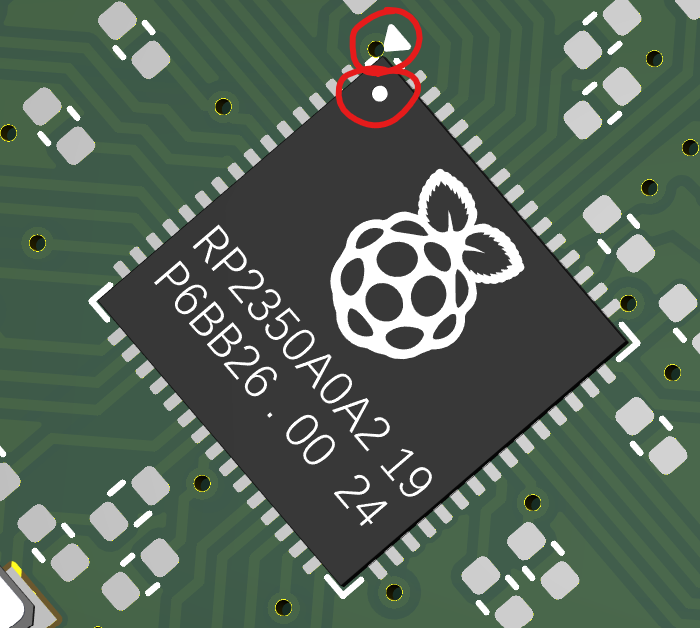
Especially anything assembled by JLCPCB or soldered by hand yourself. A part placed backward is the single most common reason a “correctly designed” board doesn’t work. The first pin of a chip should match the dot that’s on the silkscreen in your PCB editor
Confirm your I2C addresses match reality
If two parts on your board happen to share a default address, you’ll get garbage or nothing back. An I2C scanner sketch (easy to find online) lists every address actually responding on your bus.
for (byte addr = 1; addr < 127; addr++) {
Wire.beginTransmission(addr);
if (Wire.endTransmission() == 0) {
  Serial.print("Found device at 0x");
  Serial.println(addr, HEX);
}
}
Make sure pin numbers in code match your actual PCB
Make sure pin numbers in code match your actual PCB, not just what you meant to do in the schematic. It’s really easy to wire GPIO 3 in the schematic and then reference a totally different pin in your code.
Isolate input from output
If nothing’s working, comment out everything except reading your input over Serial. Get that solid before you layer getting the output to work.
Re-read the register map one more time
If your data looks scrambled, a wrong register, wrong byte order, or a missed wake-up step are the usual suspects.
Helpful resources
altium.com/documentation is super helpful, as well as asking people in the #electronics channel on Slack!