Before submitting, make sure you have:
- A public GitHub repo with your README, project files, production files, firmware, and journal.md
- 5 hours tracked with journaling or Lookout. Each journal.md entry titled with how much time you spent that session and at least one screenshot per entry
- If you used Lookout, your Lookout Session ID for the submission form (see below for where to find it)
- A good README that has your BOM (bill of materials). More on that below.
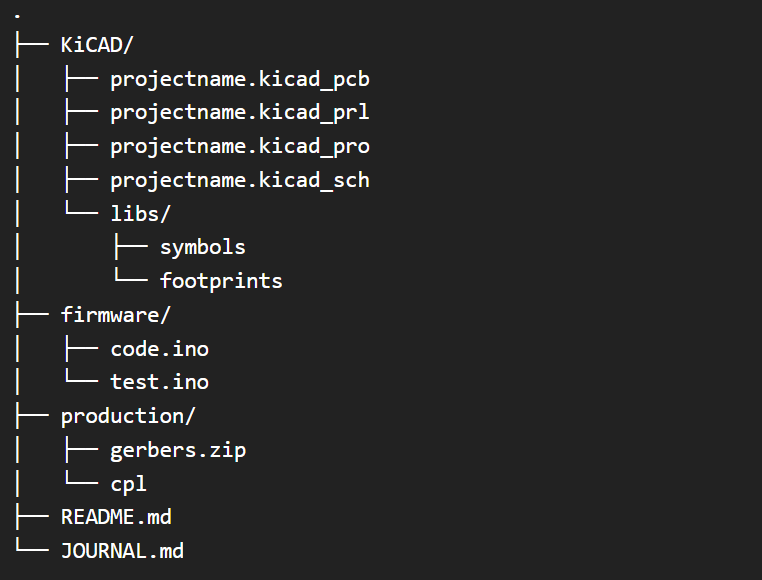
Here’s what a good GitHub repo file structure looks like:
README + BOM
A good readme has the project name, the input, output, and connector you rolled, a short description of what your board does, and some screenshots of your PCB. The BOM should have part name, quantity, cost, and where it’s from:
| Part                | Qty | Source          |
|---------------------|-----|-----------------|
| XIAO RP2040          | 1   | Seeed Studio    |
| DS18B20 temp sensor  | 1   | JLCPCB catalog  |
| 4.7k resistor        | 1   | JLCPCB catalog  |
| Passive piezo buzzer | 1   | JLCPCB catalog  |
Finding your Lookout Session ID
If you tracked your time with Lookout, the submission form asks for your Lookout Session ID, this just tells us which session is yours so we can check your timelapse; it’s not a secret, so it’s safe to paste into the form.
You’ll see it in the message under the Lookout button (on this guide or your dashboard) right after you start a session, it looks like Opening Lookout... your Session ID: xxxxxxxx. Click the ID to copy it. That message stays there any time you revisit a page with the Lookout button, so if you lose it, just go back to wherever you clicked the button and it’ll be waiting for you.